
Session Lore Tab
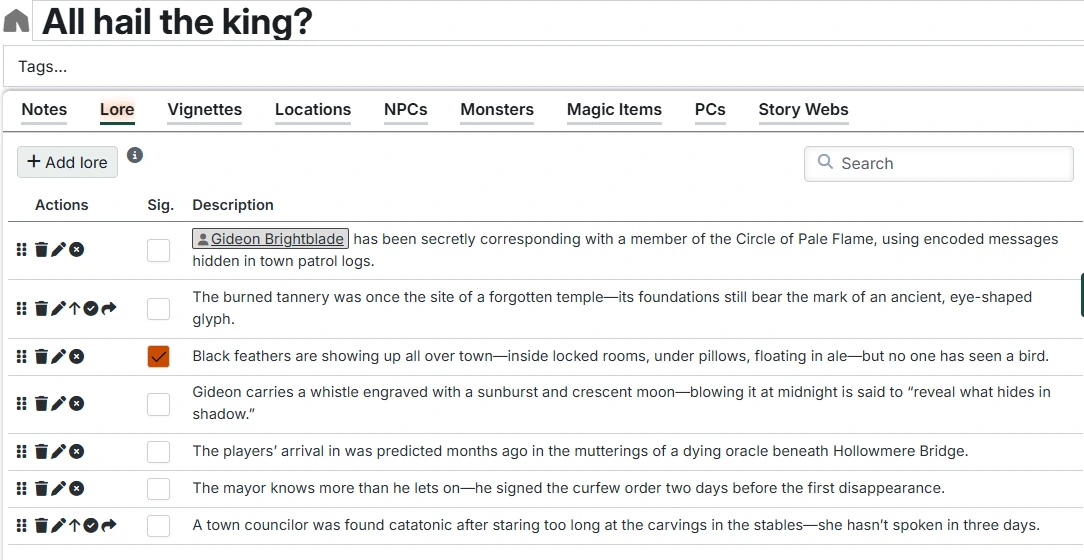
The Lore tab (equivalent to "secrets and clues" in the Lazy DM method) allows you to manage pieces of Lore that you might want to deliver to players during the Session.
This tab provides:
Adding Lore
Click "Add Lore" to create a new Lore entry. Enter the text of the Lore and hit "Enter" to save.
The Lore list
This list contains the individual pieces of Lore. You can add links to Foundry documents (like Journal Entries) and Campaign Builder content in the text.
Moveable
New lore items are added to the bottom of the list, but you can reorder the list by dragging the handle on the left side of each row to move rows up and down.
Lore Actions
The actions column lets you take several actions with the Lore entries:
- Delete - Delete the Lore
- Edit - Opens the Lore description text box for inline editing. You can also click on the description text to do the same. Press Enter to save or Escape to cancel. Shift-Enter within the text box to insert a new line.
- Mark as delivered - Marks the Lore as having been delivered to the players. This will make it show in the "Delivered Lore" list on the Campaign Lore Tab. If you mark Lore as delivered while in Play Mode, this will add the Lore item to the Campaign To-Do List.
- Move to arc - This moves the Lore back to the Arc Lore list. You would typically do this after a Session for Lore that you want to keep but don't think the next Session will be appropriate.
- Move to next session - This moves the Lore to the next Session. You would typically do this after a Session for Lore that you didn't deliver but still want to. If a next Session doesn't exist, it will create one.
"Significant" lore
The "Sig." (Significant) column indicates whether this lore should be treated as significant to the overall Campaign or only relevant to this Session. This determines whether it will show up on the Campaign delivered lore list or not.
Related Entry Tracking
This table supports Related Entry Tracking. When you add or remove references to Characters or Locations in the lore, you'll be prompted to update the Arc's Participants and Locations tables accordingly.