Arc Details
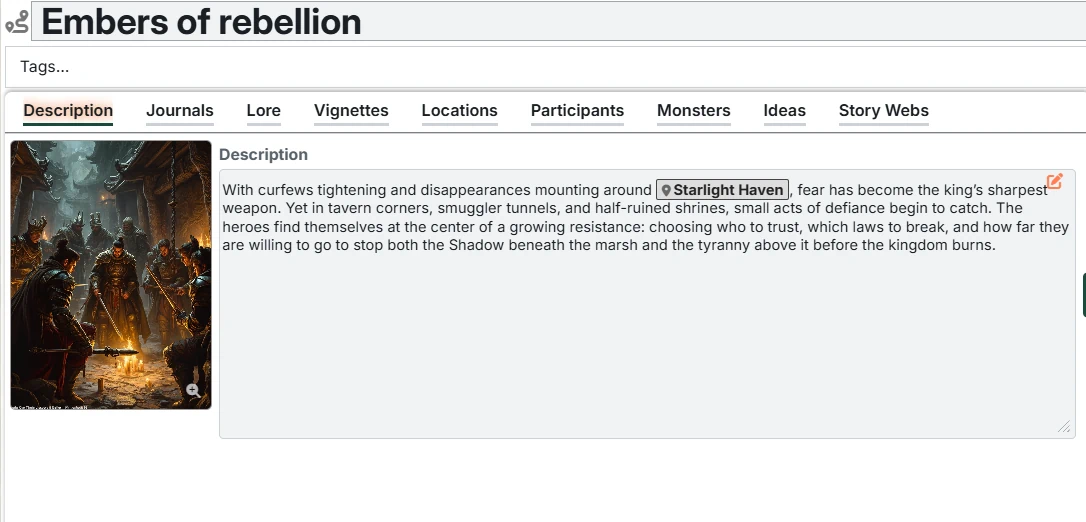
The Arc window provides tools for planning and tracking story arcs within a Campaign. Each Arc covers a range of Sessions and gives you space to track key locations, participants, monsters, lore, and ideas for that storyline. They also are a convenient place to build out future plans for upcoming (but not the very next) Sessions.
How Arcs relate to Sessions
- A Campaign can have multiple Arcs - and must have at least one.
- Each Arc is defined by a start session number and end session number.
- Arcs can be left "blank" (no sessions assigned) if you just want a placeholder for future story beats.
Arc Header
The header of an Arc contains:
- Name – You can click the Arc's name to edit it.
- Tags – Optional Tags for the Arc. These work the same way as tags on Campaigns, Sessions, Entries, and Fronts, and are useful for search and quick scanning.
Tabs
Arcs have the following tabs where you can manage their details:
- Description – a high-level overview of what the Arc is about
- Journals – a place to track Foundry journal entries that relate to the Arc. Good for tracking extra images or any other content that you want to keep track of and/or share with the player(s)
- Lore – Arc-specific secrets, clues, and revelations tied to this portion of the campaign
- Vignettes – Vignettes you are preparing for the arc and can move into the next session when ready
- Locations – the Locations that appear in this Arc, with Arc-specific notes
- Participants – important Characters and Organizations that matter for this Arc
- Monsters – notable monsters or enemies that show up in the Arc
- Magic Items – magic items that may appear during this Arc
- Ideas – free-form ideas you might want to use somewhere in this Arc
- Story Webs - list of story webs that you have associated with this Arc
- Timeline - view calendar events from Calendaria that relate to this Arc