
Arc Participants Tab
[screenshot: arc-participants]
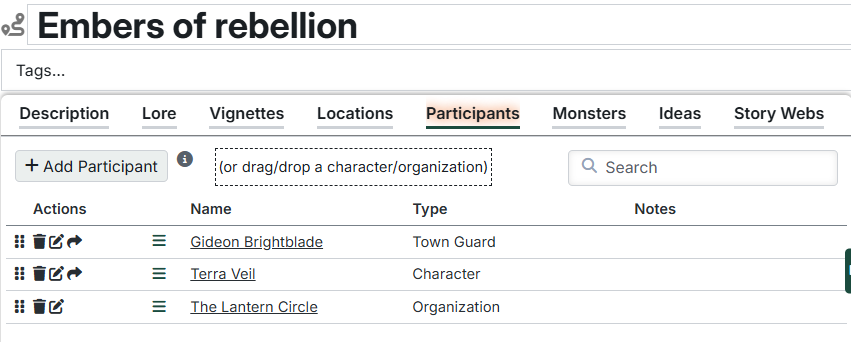
The Participants tab lets you track important Characters and Organizations that are involved in this Arc. These Entries must be created in the Setting as the list is simply a link to existing Characters or Organizations.
This tab provides:
Adding Participants
Click "Add Location" to create a new Location entry. You will be prompted to search for an existing Location.
You can also drag/drop from the Setting Directory.
The Participant list
This list contains the individual Entries. For each Entry, you can see its name and Type.
Click the name of the Entry to open the details page. Hold Control to open in a new tab, Alt to open in a different panel.
You can also add notes to each Entry to track how it will be used in the Arc. Click the notes field for a row or click the "Edit" icon to open the row editor.
Moveable
You can reorder the participant list by dragging the handle on the left side of each row to move rows up and down.
Drag to Scene
If a Character has associated Actors, a drag handle will appear in the drag column. Drag this handle to drop the top Actor in the list onto a scene (or anywhere else) in Foundry.
Tag-associated Actors
If a Character has no manually-added actors but has a tag associated with an actor, the row will still be draggable as if it had a manually-added Actor.
Participant actions
The actions column lets you take several actions with the Location entries:
- Delete - Delete the Entry. This removes it from the Arc list, but DOES NOT delete the Entry from the Setting.
- Edit - Allows you to edit the notes for the Entry. Press Enter to save or Escape to cancel. Shift-Enter for new line.
- Copy to next session - This makes a copy of the Entry on the next Session. It doesn't remove it from the Arc in case you want to use it again later.
CAUTION
Move/copy to next session buttons on the various Arc tabs push to the latest Session in the Campaign - even if it's in a different arc
Related Entry Tracking
This table supports Related Entry Tracking. When you add or remove references to Characters, Organizations, or Locations in participant notes, you'll be prompted to update the Arc's Participants and Locations tables accordingly.